
Download Write A Thank You – AI‑Powered Thank You Note Generator
Overview
Write A Thank You is a cloud‑based, subscription‑driven application that transforms the often‑tedious task of writing thank‑you notes into a swift, enjoyable experience. Powered by advanced generative AI, the tool assists users in crafting personalized, heartfelt messages for any occasion—weddings, corporate events, birthdays, or simple everyday gratitude. Its clean, intuitive interface welcomes both seasoned writers and casual users, allowing you to generate polished notes in seconds without sacrificing authenticity.
Beyond mere text generation, Write A Thank You incorporates grammar checking, readability scoring, and plagiarism detection to ensure each note is both correct and original. Integrated with popular writing suites such as Google Docs and Microsoft Word, the app can pull in drafts, suggest improvements, and export finished notes directly to email or printable formats. A built‑in resource hub offers templates, tone guides, and etiquette tips, making it a comprehensive companion for anyone who wants to express appreciation with confidence and style.
Whether you are a busy professional needing to thank clients, a bride planning post‑wedding correspondence, or a student looking to acknowledge mentors, Write A Thank You streamlines the process while maintaining a personal touch. The subscription model includes regular AI updates, new template packs, and priority support, guaranteeing that the service stays current with language trends and security standards.
Key Features
- AI‑Generated Messages: Instantly produce customized thank‑you notes based on occasion, tone, and recipient profile.
- Grammar & Style Checker: Real‑time correction of spelling, punctuation, and style inconsistencies.
- Readability & Sentiment Analysis: Automated audits that score clarity and emotional impact.
- Plagiarism Scanner: Ensures each note is original and free from accidental copying.
- Template Library: Over 150 pre‑designed layouts ranging from formal corporate to casual friendly.
- Integration Suite: Seamless connection with Google Docs, Microsoft Word, and popular email clients.
- Interactive Elements: Ability to embed photos, QR codes, or video links directly into digital thank‑you cards.
- Multi‑Language Support: Generates notes in English, Spanish, French, German, and more.
- Resource Hub: Access to etiquette articles, tone guides, and sample letters.
- Secure Cloud Storage: Saves drafts safely with end‑to‑end encryption.
Installation, Usage & Compatibility
Getting started with Write A Thank You is straightforward. As a web‑based service, there is no traditional download; you simply create an account at writeathankyou.com. The sign‑up process takes under two minutes—enter your email, choose a subscription tier, and verify your account. Once logged in, the dashboard presents a clean canvas with three primary tabs: “Create Note,” “My Library,” and “Resources.”
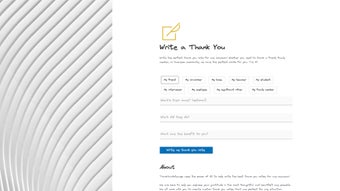
To craft a note, click “Create Note,” select the occasion (e.g., wedding, business meeting), and fill in brief details about the recipient and desired tone (formal, warm, humorous). The AI engine then generates three distinct drafts within seconds. You can edit any draft directly, invoke the grammar checker, or request a new variation. When satisfied, use the export options to send the note via email, download a printable PDF, or share a link to a personalized digital card.
Write A Thank You runs on any modern browser (Chrome, Firefox, Edge, Safari) and is fully responsive on mobile devices, making it equally usable on Android and iOS tablets or phones. For power users, a Chrome extension allows note generation without leaving the current webpage, while a Microsoft Office add‑in places the AI directly inside Word. The platform adheres to GDPR and CCPA regulations, ensuring your personal data remains private. Regular updates are pushed automatically, delivering new templates, language models, and security patches without any manual intervention.
Compatible Operating Systems: Windows 10+, macOS 10.14+, Linux (any modern distro), Android 8+, iOS 13+
Pros & Cons, FAQ & Final Thoughts
Pros
- Fast, AI‑driven note creation saves time.
- High‑quality grammar and plagiarism checks.
- Rich template library and multi‑language support.
- Seamless integration with popular writing tools.
- Secure cloud storage with regular updates.
Cons
- Subscription cost may deter occasional users.
- Internet connection required for full functionality.
- Advanced customization options limited to premium tier.
Frequently Asked Questions
Can I use Write A Thank You offline?
The core AI engine runs on cloud servers, so an internet connection is required to generate notes. However, drafts saved in your library can be accessed offline through the mobile app’s cached storage.
Is there a free trial available?
Yes, new users receive a 14‑day free trial with full access to all features, including premium templates and integrations.
How does the plagiarism checker work?
The tool compares the generated content against a constantly updated database of public web pages and academic sources, flagging any similarity above a 5% threshold.
Can I customize the tone beyond the preset options?
Absolutely. After the AI produces a draft, you can edit any sentence, adjust word choice, or add personal anecdotes to fine‑tune the tone to your exact preference.
Is my data safe?
Write A Thank You employs end‑to‑end encryption, regular security audits, and complies with GDPR and CCPA, ensuring that your personal information and drafts remain confidential.
Conclusion & Call to Action
In a world where expressing gratitude is often sidelined by busy schedules, Write A Thank You offers a reliable, AI‑enhanced solution that bridges efficiency with genuine sentiment. Its blend of rapid note generation, robust editing tools, and seamless integrations makes it a standout choice for professionals, event planners, and anyone who values thoughtful communication. While the subscription model may be a consideration for occasional users, the time saved and the polished results typically justify the investment. Ready to transform your thank‑you workflow? Visit writeathankyou.com, start your free trial today, and experience the ease of crafting perfect gratitude messages with just a few clicks.



.png)



